
Blog

Google’s Unified Auction

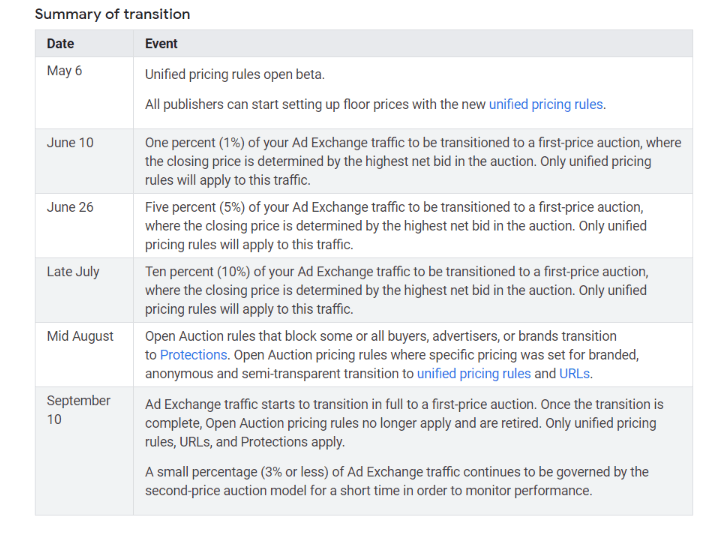
Google is in the midst of transitioning 100% of its Google Ad Manager inventory from a second price auction to a first price auction. Currently, about 10% of its inventory is utilizing a first price auction, and Google plans to fully switch to 100% first price auction in the coming weeks.

What is a Unified Auction

Definition via Digiday:

Unified auctions have replaced the more traditional waterfall model. In a unified auction, multiple ad exchanges can have access to the same publisher inventory, at the same time and bid accordingly. The former waterfall model was more like a hierarchy where Google had first (and often last) dibs on bidding, followed by the next exchange in the waterfall. Anything those two vendors didn’t want, was then passed to the next SSP in the chain and so on until the inventory sold. 

The biggest advantage of a unified auction is header bidding, which allows publishers to have greater bid density and competition by inserting code on the header of their pages. Header bidding has increased publisher revenue substantially, and it has evolved from a experimental tactic to a must-have aspect of publisher ad stacks.

Current Auction Mechanics

According to Marketing Land:

Currently, there may be two different auctions run for a specific ad. A second price, real-time bidding auction runs among Authorized Buyers, which include Google Ads, Display & Video 360 and other DSPs. That’s then followed by a first price auction that compares the winning price from the second price auction with a publisher’s guaranteed and non-guaranteed advertising campaigns and bids from Exchange Bidding buyers. 

Also important to note is that Google doesn’t currently enforce bid partners to share and receive bid data.

Future Auction Mechanics

According to Marketing Land:

There will be a unified first price auction that includes publishers’ guaranteed campaigns and all non-guaranteed bidders — Authorized Buyers and everyone else — at once. Bids from publishers’ guaranteed campaigns are compared against all other bidders. Non-authorized will have the same opportunities as authorized DSPs.

Google will enforce all bid partners to share and receive bid data at this stage.

Changes to Pricing Rules

Pricing rules for 2nd price auctions will become obsolete once Google Ad Manager transitions to a fully 100% first price auction. Google has released a new pricing feature called unified pricing rules.

Initially, Google had proposed a pricing rule limit of just 100 pricing rules. However, when faced with fierce backlash from publishers, Google raised the number of pricing rules to 200, and allowed further exceptions on a publisher by publisher basis. It is also important to note that these pricing rules cannot be different for different buying platforms.

Reasoning for the Change

Reducing Complexity:

Instead of running two separate auctions with different pricing mechanics, Google will just run unified auction across all buying sources.

Jason Bigler, Google:

Going forward, no price from any of a publisher’s non-guaranteed advertising sources will be shared with another buyer before they bid in the auction.

Increasing Transparency:

Because both publishers and buyers will have access to more bid data and a more transparent bid landscape, they will be able to make more informed choices about how they configure their programmatic strategies.

Google Transition Timeline

From Google itself, dates in 2019:
unified auction timeline

Sources

The successful warrior is the average man, with laser-like focus.

— Bruce Lee

camp-camping-evening-2422265

SIVT and GIVT

Fraud in advertising technology makes up a significant portion of the industry. In the past, fraudsters would implement simple and easy to catch tactics such as auto clickers, bot farms, and using the same IP address without and sort of IP randomization. As the tools to combat ad tech fraud became more and advanced and more readily available, so did sophistication of ad tech fraudsters.

A term that we hear a lot when it comes to ad tech fraud is invalid traffic (IVT). Invalid traffic is any type of traffic to a web page that is either nonhuman or purposefully creates fake engagement. IVT can be broken down into the sections: Sophisticated Invalid Traffic and General Invalid Traffic.

General Invalid Traffic (GIVT)

According to the Media Rating Council (MRC), GIVT is defined as:

“Traffic identified through routine means of filtration executed through application of lists or with other standardized parameter checks.”

Examples of GIVT:

  • Known Data Center Traffic
    • Traffic deemed by IP address to come from a server rather than a normal device such as a computer, phone, or tablet.
  • Bots, spiders and other crawlers
    • Crawlers that check the content and other information of a certain webpage, but may trigger an impression. In many cases, this these are not uses with malicious intent, and the impression is a byproduct of page scanning.
  • Activity-based filtration
    • “Users” that perform the same exact routine in a loop are most likely non-human. For example, this can be a user that clicks on an ad every 15 seconds for an hour straight.
  • Non-browser user-agent headers or unknown browsers
    • The user-agent filed in the HTTP request shows what browser the user is using. If this field is either empty or nonstandard, the traffic is filtered out as GIVT.
  • Pre-fetch or browser pre-rendered traffic
    • Site content that has been preloaded to offer a smoother user experience, but is never actually seen by the user. A common occurrence of this is when the user does not scroll down to the preloaded content before exiting the page.

Sophisticated Invalid Traffic (SIVT)

According to the Media Rating Council (MRC), SIVT is defined as:

“Difficult to detect situations that require advanced analytics, multi-point corroboration/coordination, significant human intervention, etc., to analyze and identify.”

Examples of SIVT:

  • Bots and crawlers pretending to be legitimate users
    • Crawlers that check the content and other information of a certain webpage, but may trigger an impression. These are considered SIVT when they use standard browser identifiers to intentionally pretend to be a legitimate user.
  • Malware and hijacked devices
    • Fraudsters may use malware to hijack user devices and drive illegitimate traffic. In some cases, the program is running in the background of the user’s device so that the user may not even notice they are hijacked.
  • Invalid proxy traffic
    • Using a proxy that looks standard and legitimate to mask traffic that would normally draw a red flag. An example would be using this hide traffic from data centers.
  • Incentivized manipulation of measurements
    • This is a human form of invalid traffic to attract advertiser spend. Examples include reporting inflated traffic levels and key metrics such as CPA.
  • Falsely represented sites and ads
    • This is essentially domain spoofing. With ads.txt currently widely used and ads.cert in the works, this has become less of an issue. However, marketers must still be cautious as not every site is using ads.txt.
  • Cookie stuffing
    • MRC defines cookie stuffing as: “inserting, deleting, or misattributing cookies thereby manipulating or falsifying prior activity of users”.
  • Manipulation or falsification of location data
    • Marketers tend to pay a premium for location data, and fraudsters use this to their advantage by creating fake location data and or manipulating location data to attract marketers.

Sources

It had long since come to my attention that people of accomplishment rarely sat back and let things happen to them. They went out and happened to things.

— Leonardo Da Vinci

highway-landscape-light-1966974

Video File Definitions

Within the videos that many of us watch on a weekly basis, there are many separate components that all play a part in letting the video run smoothly. Many of us have heard of terms such as bitrate, codec, avi, etc, but not many people actually know what these terms mean. The fragmented nature of video files is one of the many reasons why video advertising sees so many more errors than display advertising, where only a simple image file needs to bee displayed. Today’s article will break down the many different components of a video file and how each plays a part rendering the video to the user.

Aspect Ratio

An aspect ratio is the relation ship between a video’s length and width in a ratio format. For example, a video that is 1000×500 has an aspect ratio of 2:1. The most common  video aspect ratios today are 4:3 (fullscreen) and 16:9 (widescreen). Films in the 1970s used 4:3 aspect ratios as that was the aspect ratio of the films that they were shot on. These days, the majority of video files use the 16:9 aspect ratio to accommodate the modern tv screen.

Dimensions

The majority of video files today use video dimensions in multiples of 16. As an example, let’s look at the Youtube video sizes that we are all familiar with. Youtube videos use the 16×9 aspect ratio.

  • 2160p: 3840×2160, 4K HD
  • 1440p: 2560×1440 HD
  • 1080p: 1920×1080 HD
  • 720p: 1280×720 HD
  • 480p: 854×480 Standard Definition
  • 360p: 640×360 Standard Definition
  • 240p: 426×240 Standard Definition
  • 144p: 256×144 Standard Definition

Capture.PNG

Bit Rate

A video’s bit rate measures how much data a video contains, measured in megabits per second (mbps). In general, there is a linear relationship between bit rate and video quality. Higher quality resolutions such as 4K HD tend to have higher bit rates. In addition, more compressed video files will take up less space on a hard drive but have lower video quality. With high quality videos, households with weak internet connections will see constant buffering to allow for the video to play.

Frame Rate

A frame rate is exactly like it sounds. It is the number of frames that appear on the screen per second. With a frame rate of 60fps, there would be 60 images or “snapshots” shown per second. Videos with smaller frame rates are a source of those choppy images that we’ve all come across. (Note that this is different from the bit rate lag. Bit rate lag actually shows the user a smooth picture when it is playing, but buffer from time to time. Frame rate lag will constantly show the picture without buffering stops, but lag constantly).

File Size

The amount of space that the video file would take on a hard drive. This can be calculated by bit rate * duration.

Duration

This is simply the duration of the video.

File Format

File formats are the containers that hold the video files. These containers include everything from video codecs, audio codecs, and data. It’s important to note that many file formats and codecs can be mixed and matched.

A comprehensive pictograph on file formats by uscreen.tv can be found below.

design-15-03.png

Codec

This is the compression and decompression method used to compress a particular video file. The primary purpose of a codec is to pack up video files to save space and unpack them while a user watches the video. Because of poor codec quality and compatibility issues with the different file formats, it is not uncommon for users to experience playback errors when using different codecs.

Example video codecs:

  • FFmpeg
  • Xvid
  • DivX
  • H.264
  • H.263
  • MPEG-4
  • MPEG-2

Audio

It’s important to note the audio files are actually separate from video files. However, they are held in the same file containers. The audio codec will have to work in conjunction with the video codec to display a video file. Sometimes, an audio codec may malfunction while the video codec works, resulting in a video without sound.

Example audio codecs:

  • WAV
  • AIFF
  • MP3
  • AAC
  • WMA
  • Opus

Sources

It’s unwise to pay too much, but it’s worse to pay too little. When
you pay too much, you lose a little money – that’s all. When you pay
too little, you sometimes lose everything, because the thing you
bought was incapable of doing the thing it was bought to do. The
common law of business balance prohibits paying a little and getting a
lot – it can’t be done. If you deal with the lowest bidder, it is well
to add something for the risk you run, and if you do that you will
have enough to pay for something better.

— John Ruskin

blank-clean-contemporary-1557183

ATSC 3.0

ATSC 3.0 the broadcast TV networks’ way of going OTT. With the advent of OTT/CTV, broadcast TV networks have been seeing dwindling viewer numbers as more and more people cut the cord. ATSC stands for the Advanced Television Committee Standards. It is the next major standard in watching broadcast TV.

How Does ATSC 3.0 Work?

ATSC 3.0 functions through the implantation of a chip within the devices of which a user would watch broadcast TV from. Because this technology is not currently released yet,  the devices available today would not be able to run ATSC 3.0. Users would have to purchase devices that come fitted with the ATSC 3.0 chip in order to watch broadcast TV on their devices. Alternatively, there may be adapters available that will allow users to run ATSC 3.0 on their older devices that don’t come fitted with the chip.

What are the Benefits?

  • ATSC 3.0 extends the availability of traditional broadcast TV to all sorts of devices. This includes tablet, smartphone, laptop, desktop, and more.
  • Users can view content through the chip in their devices, which does not directly connect to the internet and waste valuable bandwidth.
  • There will be a picture quality upgrade from traditional 1080p to the modern 4K HD with HDR. There is  even potential for ATSC 3.0 to run at 8K!
  • Depending on the person, this one may be either a negative or a positive. ATSC 3.0 will be able to track users similar to how users are already tracked on the internet with geographical targeting, behavior targeting, etc. This will allow broadcast TV providers to show targeted ads instead of just showing the traditionally predetermined ads.

What are the Downsides?

  • Because devices require the ATSC 3.0 chip, usage of ATSC 3.0 will be contingent of device manufacturers such as Apple and Samsung to create them w
  • A large reason why ATSC 3.0 may be effective is because users will finally be able to watch their favorite broadcast news stations on mobile devices. If the major broadcast news stations were able to eventually allow their programs to be streamed, then one of the major benefits of including ATSC 3.0 will be repetitive.
  • ATSC 3.0 is not backwards compatible, so users who have not updated to the newest devices will have to purchase a converter.
  • Targeted ads – may be positive or negative depending on the person.

When will we be able to use ATSC 3.0?

Dennis Wharton, executive vice president of communications at the National Association of Broadcasters, told CNET that we’ll likely see TVs that can actually receive ATSC 3.0 in stores by Christmas 2020.

Sources

The way to get started is to quit talking and begin doing.

— Walt Disney

architecture-bird-s-eye-view-buildings-1682852

Video Advertising Overview

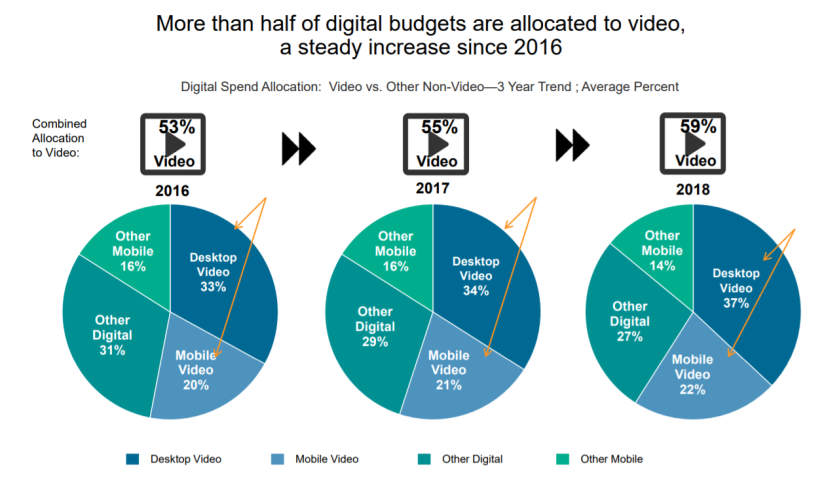
Of the 3 major forms of digital advertising (display, video, and  app), video takes a large chunk off the pie when it comes to total ad spend.

According to a joint video ad spend study performed by IAB and Advertiser perceptions, video ad spend actually exceeded 50% for some brands and is still growing!

Capture.PNG

It’s no secret that video plays a significant role when it comes to digital advertising. However, it is also known to be the most difficult to implement and comes with a plethora of inevitable errors. One of the larger aspects of video integration to take into account is the integration of the publisher video player with the advertising exchange. A successful integration on this front means that the publisher video player can successful call for a video ad and show the video ad with the highest bid.

Video vs Display Ads

Below are official IAB definitions on several main aspects of digital ads when comparing display and video. 

Display Video
Impression Counting An impression is counted once the ad content is downloaded to the user’s device. An impression is counted once the video ad starts playing. This ensures a more accurate impression count if the user navigates away from the page.
Tracking Events Impressions and clicks are the primary metrics. Many more metrics are available, such as the number of times the video reached its first quartile, midpoint, third quartile, or completion.See the full list of video ad metrics.
Where the Ad Serves Before a display creative is served, the ad slot is an empty space. The creative is then served directly onto the page. Before a video creative is served, the video player is already on the page playing other video content. The creative is served directly into the player.

Common Video Ad Types

  • Preroll: Video ad that precedes the publisher video content. This is by far the most common video ad out there.
  • Midroll: Video ad that interrupts the publisher video content somewhere between the start and end of the  video.
  • Postroll: Video ad that is shown after the publisher video content ends. This type of video ad is very uncommon. This is because most users tend to click away from the video after it ends, leaving the ad unviewable or not servable at all.
  • Outstream: Video ad that serves outside of the publisher video player. Outstream ads can pop out and expand from any area on the page.
  • Interstitial: Full page video ad that can be closed to exit the ad.

Publisher Integration Base Parameters

In order for a publisher video player to connect to an exchange, it must be mapped correctly with the exchange in order to pass requests and receive information on the video advertisement.

Below are video parameter requirements required from publishers by GetIntent. Although the parameters and their formats may differ depending on the tech provider, the general terms and parameters passed should remain relatively similar. Within this table, we see parameters such as the publisher id, video size, and video duration. All of the common aspects of running video can be passed as the base video parameters. 

Name

Mandatory

Description

Example

pid required The ID of the underlying publisher, registered in the platform. pid=4
tid required The ID of the publisher Tag (Preconfigured in the platform or custom) tid=abc
protocols optional The numeric list of the restricted VAST protocol versions, split by comma.

  • 1 – VAST 1.0
  • 2 – VAST 2.0
  • 3 – VAST 3.0
  • 4 – VAST 1.0 Wrapper
  • 5 – VAST 2.0 Wrapper
  • 6 – VAST 3.0 Wrapper

Unless provided, it will match all versions of the VAST protocol.

protocols=2,3,5,6
size optional The size of the player. 
Unless provided, the size will be taken from the Tag configuration in the platform, if set.
size=640×480
mimes optional*

The list allowed mime types, split by comma. 
Unless provided, the system will try to fill it with the list of mime types in the Tag configuration in the platform. Unless, it will match any mime type.

mimes=application%2Fjavascript,video%2Fmp4
min_dur optional Minimal duration of video ad in seconds. min_dur=30
max_dur optional Maximal duration of the video ad in seconds. max_dur=60
min_btr optional Minimal bitrate of the video ad, kbps. min_btr=128
max_btr optional Maximal bitrate of the video ad, kbps. max_btr=512
pb optional Passback VAST URL, which will be returned in the VAST Wrapper in case no inventory is matched for the given request. 
Unless provided, the system will try to take it from the Publisher configuration. Unless, an empty VAST response will be served.
pb=http%3A%2F%2Fad.content.vast%2Fpassback
vi_format optional Video inventory format. Possible values:

  • 1 – In-Stream video
  • 2 – Out-Stream video

Unless provided or directly set in publisher tag configuration in the platform, an inventory is marked as In-Stream.

vi_format=2
api optional API of the inventory. Possible values:

  • 1 – VPAID 1.0
  • 2 – VPAID 2.0
  • 3 – MRAID-1
  • 4 – ORMMA
  • 5 – MRAID-2
api=1,3
skippable optional Skippability of the inventory. Possible values (case insensitive):

  • ALLOW – skippable inventory is allowed
  • NOT_ALLOW – skippable inventory is not allowed
  • REQUIRE – only skippable inventory is allowed
  • UNKNOWN – skippability is unknown (default value)
skippable=allow


Sources

I have opinions of my own, strong opinions, but I don’t always agree with them.

— George H.W. Bush

beach-beautiful-chair-1267473.jpg